Delay Became Loss: Reading the Microsoft 365 Outage Through the Email Threat Taxonomy

Delay Became Loss: Reading the Microsoft 365 Outage Through the Email Threat Taxonomy
TL;DR
- Exchange Online started failing at 16:17 UTC on Thursday 12 November and Microsoft declared service restored on Saturday 14 November. Microsoft blames a network change, not an attack.
- Microsoft deferred inbound mail with temporary 4xx errors. That’s correct SMTP behaviour, but a deferral is only safe if the sender keeps retrying for longer than the outage lasts. Mailgun (8 hours), Postmark (12) and Resend (14) gave up before traffic recovered after 17 hours 45 minutes; Postfix and Exim senders kept their mail.
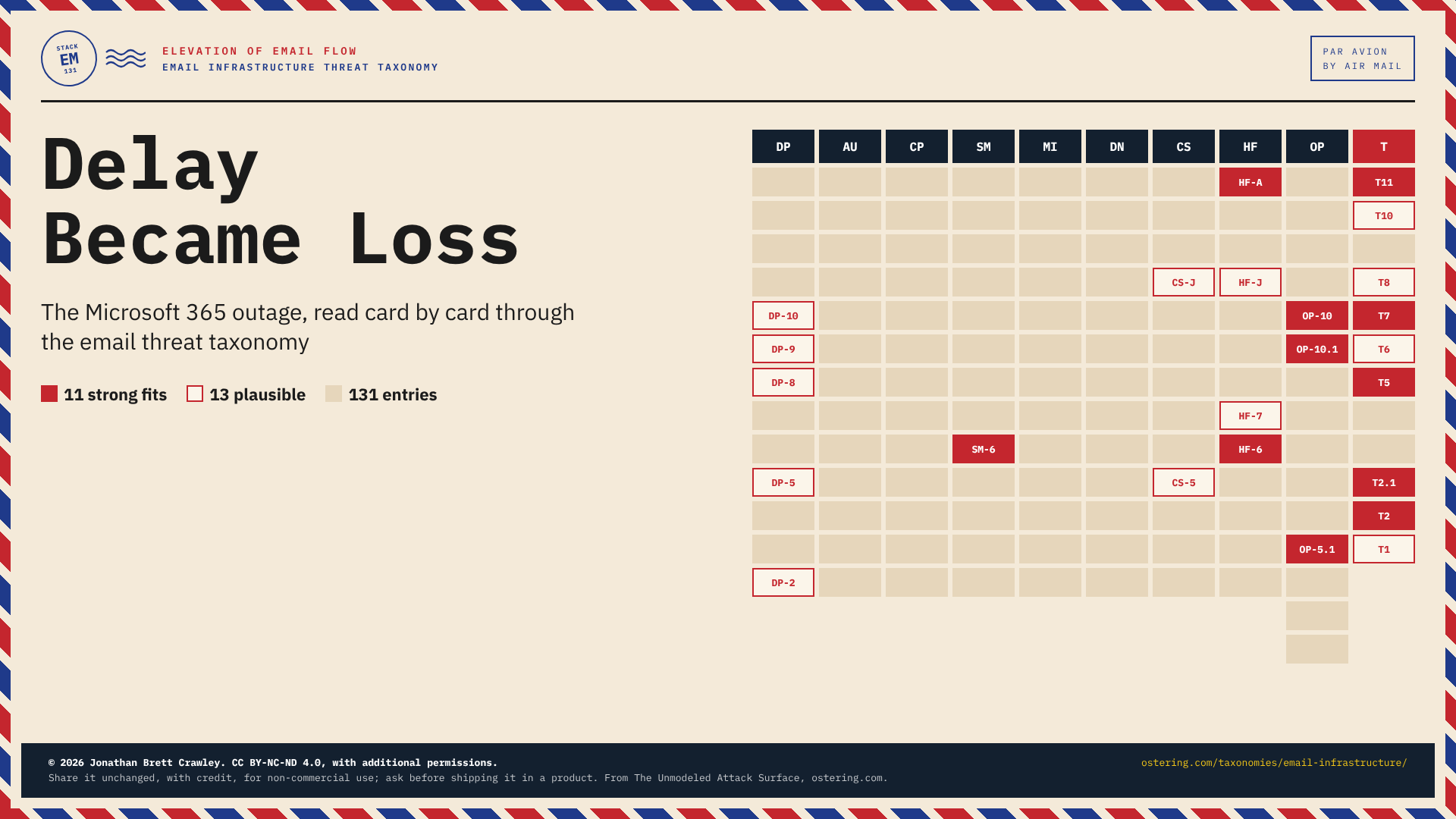
- I mapped the incident against my email infrastructure threat taxonomy. Eleven entries fit strongly and thirteen more plausibly, across six of the ten sections.
- Each entry comes with a mitigation principle and numbered design measures, so the cards that describe what went wrong also tell you what to change. That’s what the rest of this post is about.
- The incident also exposed gaps the taxonomy didn’t cover, so I’ve added five new entries: three structural hazards (EM-T2.1, EM-T10 and EM-T11) and two in operations and storage (EM-OP-5.1 and EM-OP-10.1).
If you were on Outlook last Thursday, you already know what happened to you. Most of the coverage has been about Microsoft’s customers: hospitals, courts, police forces, banks and government departments, with Downdetector reports from 74 countries. What I want to look at is what happened to everyone else, because email is the one system where your outage is also everybody else’s problem.
I also want to use this outage to show something. When an incident hits, the hardest part isn’t finding out what happened. It’s turning “what happened” into “what should we change”, in a form your engineers, your suppliers and your board can all act on. That’s the job I built the taxonomy to do.
The Taxonomy in Two Minutes
The email infrastructure threat taxonomy is the reference behind my Elevation of Email Flow card game. It splits the email stack into nine layers, from the delivery pipeline and authentication protocols up to the human-facing layer and operations, plus a tenth section of structural hazards that cut across the whole stack. There are 131 entries in all, including five I added after this outage.
Every entry has the same anatomy:
- a reference such as EM-T7 or EM-OP-10, so you can cite it in a ticket, a risk register or a design review;
- a threat, written in a sentence or two that a non-specialist can follow;
- a mitigation principle: the property the system should have;
- numbered design measures that get you there;
- mappings to STRIDE (Spoofing, Tampering, Repudiation, Information disclosure, Denial of service, Elevation of privilege), CAPEC (Common Attack Pattern Enumeration and Classification) and CWE (Common Weakness Enumeration), each with an honest fit rating, so you can connect the card to the tools and catalogues you already use.
References never change once published, so they stay valid in your tickets and risk registers. When a new entry belongs next to an existing one, it gets an intermediate number: that’s why EM-T2.1 sits beside EM-T2, and EM-OP-10.1 beside EM-OP-10. The five entries added this week are the one exception to the rule: two of them moved from the hazards into operations and storage on the day they were published, after a reviewer pointed out that they belonged there, and the version history on the overview page records the change.
Here’s where last week landed on the map:
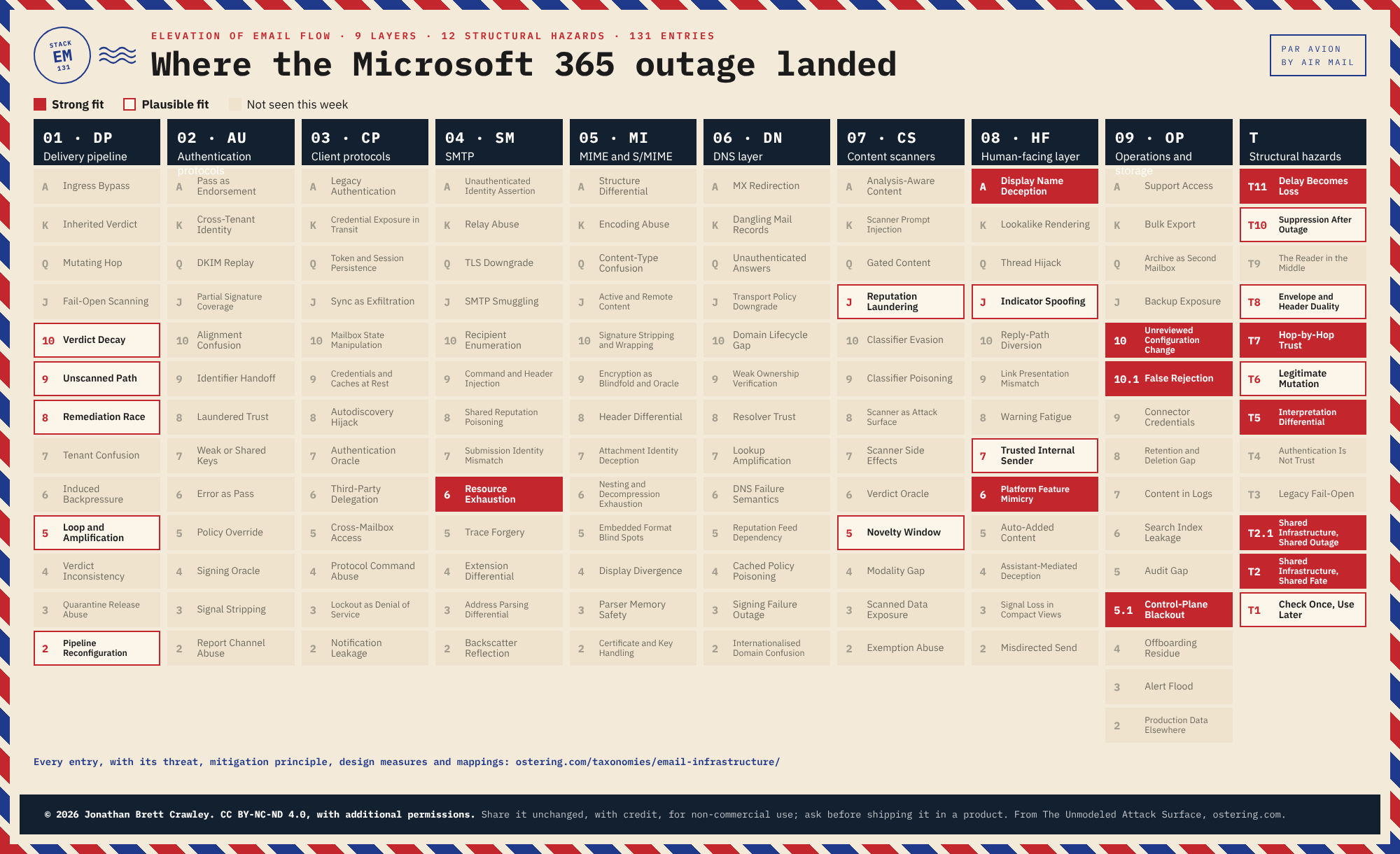
Solid red: strong fit. Outlined: plausible fit. The full entries are on the taxonomy page.
Two things jump out. First, the structural hazards column lit up more than any layer did; this was a failure of how the parts relate, not of one component. Second, authentication, client protocols, MIME and DNS weren’t involved at all, and SMTP only through EM-SM-6 Resource Exhaustion. The protocols did what they were designed to do. The trouble was in the assumptions around them.
What Actually Happened
Microsoft tracks the incident as EX1550543 (Exchange Online) and MO1550821 (the Microsoft 365 services that depend on it). Mailbox access failed through Outlook on the web, Outlook desktop, mobile sync and the Graph API. Recovery stalled several times: servers brought back into service fell over again once traffic returned, and Microsoft’s own rebalancing kept a surge of routing calls going.
Microsoft’s explanation is that the incident “was introduced by an issue during an earlier network capacity upgrade that surfaced following a recent network change”, and that it was “not related to cyber or AI / agents”. The Post-Incident Report hasn’t been published yet, so treat that as provisional.
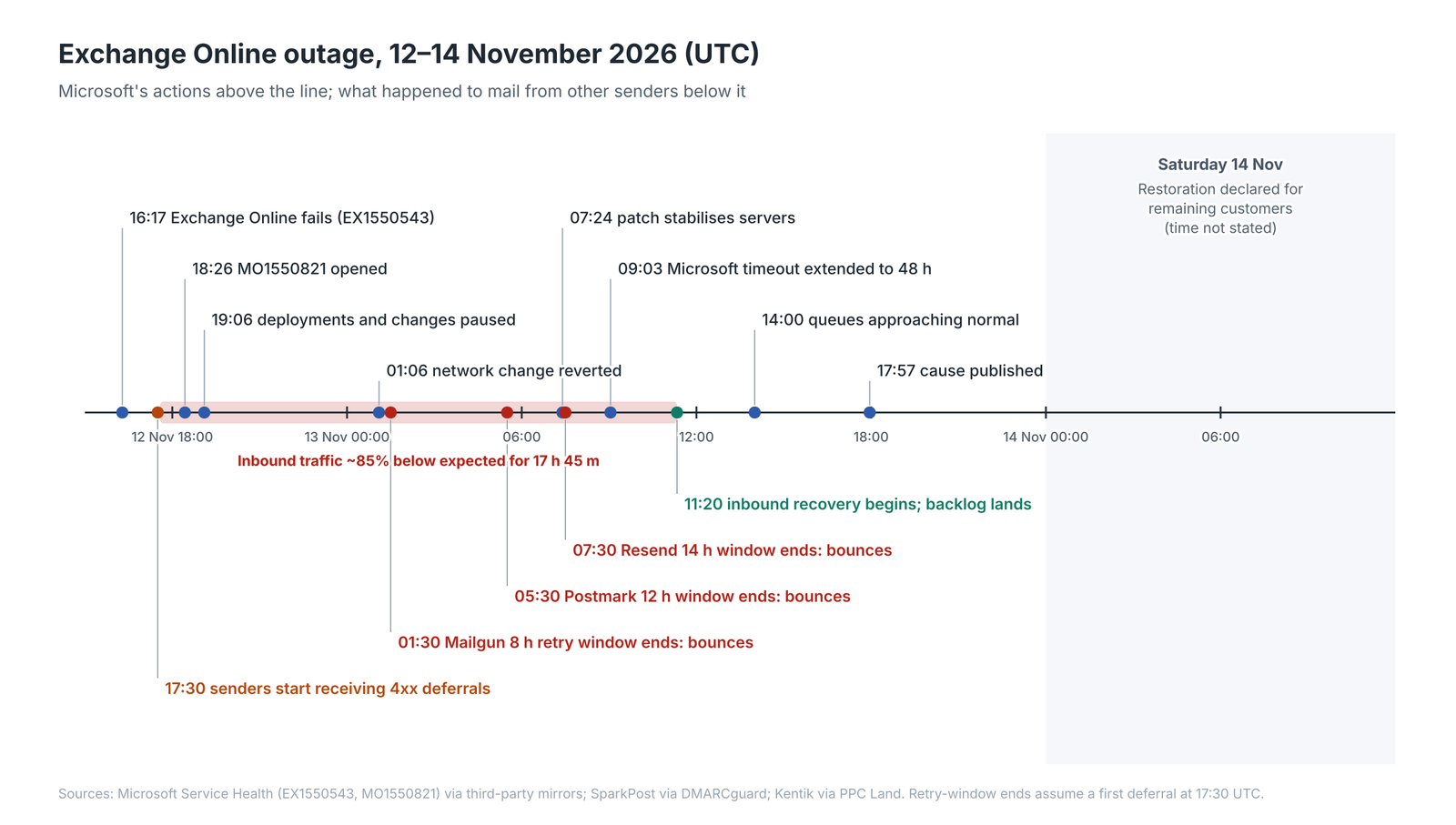
Microsoft’s actions above the line; what happened to mail from other senders below it.
One Change, Every Tenant: EM-T2
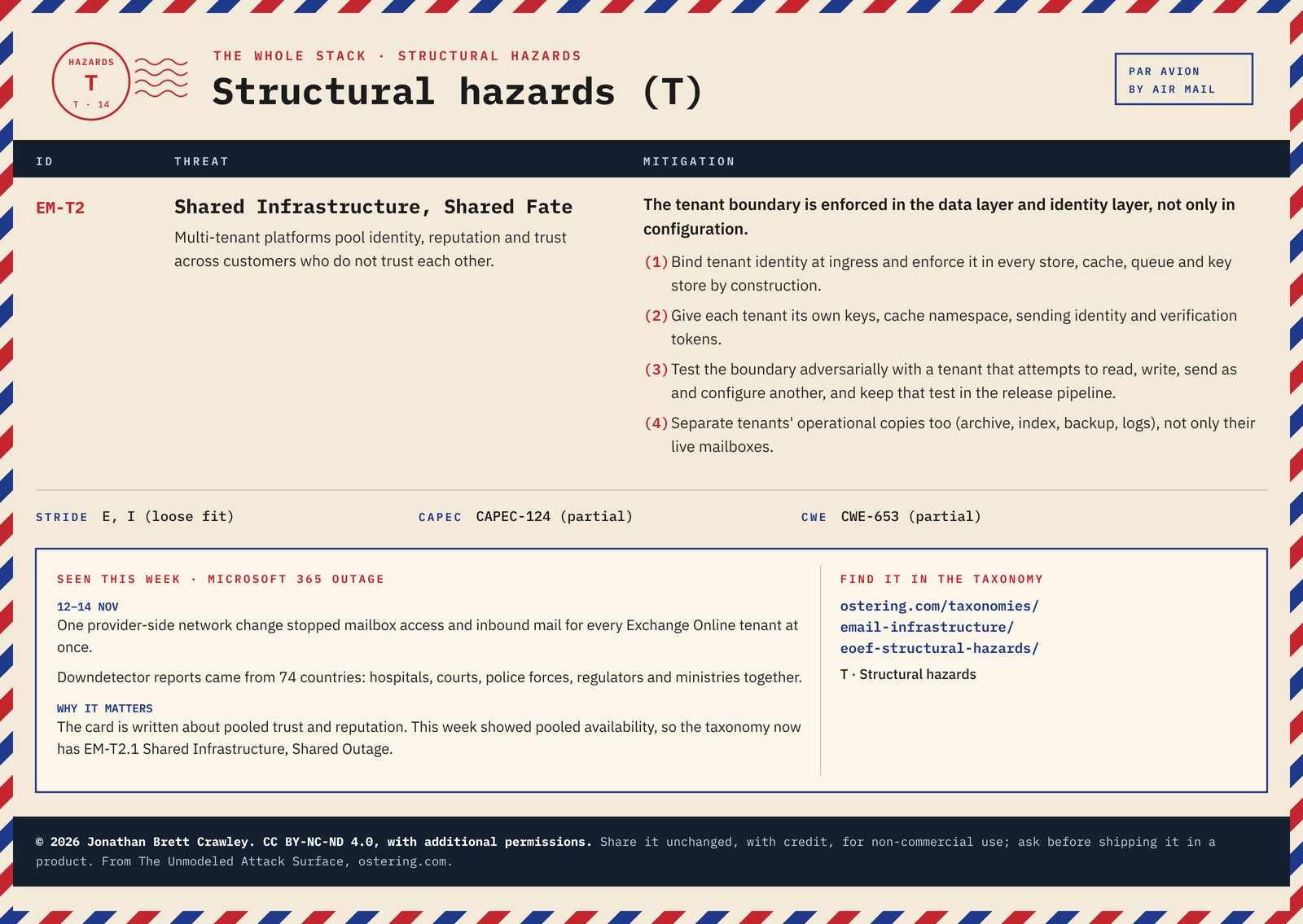
The strongest single fit is EM-T2 Shared Infrastructure, Shared Fate. One provider-side change stopped mail for every Exchange Online tenant at once, whatever their own configuration, maturity or security budget.
Look closely at the card, though, and you’ll notice it’s written about pooled trust and reputation: tenants who don’t trust each other sharing identity and sending reputation. Last week was pooled availability. Same structure, different failure. That’s useful in itself, because it shows how a card works in practice: it names the structure, and the structure is what you look for in your own design. If the answer to “what else do we share with every other customer?” makes you uncomfortable, the card has done its job.
The outage also earned EM-T2 a sibling: EM-T2.1 Shared Infrastructure, Shared Outage. Its first measure is the one that limits the blast radius next time: roll front-end, routing and capacity changes out in rings by region and by tenant, with automatic halt on error, so that one change cannot reach everyone at once.
Deferred Is Not Delivered: EM-T7
At first glance, Microsoft did everything right on the mail-flow side. From about 17:30 UTC, senders received temporary errors such as 421 4.3.2 and 451 4.7.700. A 4xx reply tells the sending server: not now, try again later.
However, it introduces a new problem. The receiving platform doesn’t decide how long the sender waits. Every sending server has its own queue lifetime, and when it runs out the message becomes a bounce. Kentik measured Exchange Online inbound traffic at about 85% below expected for 17 hours 45 minutes. Set that against the documented default retry windows:
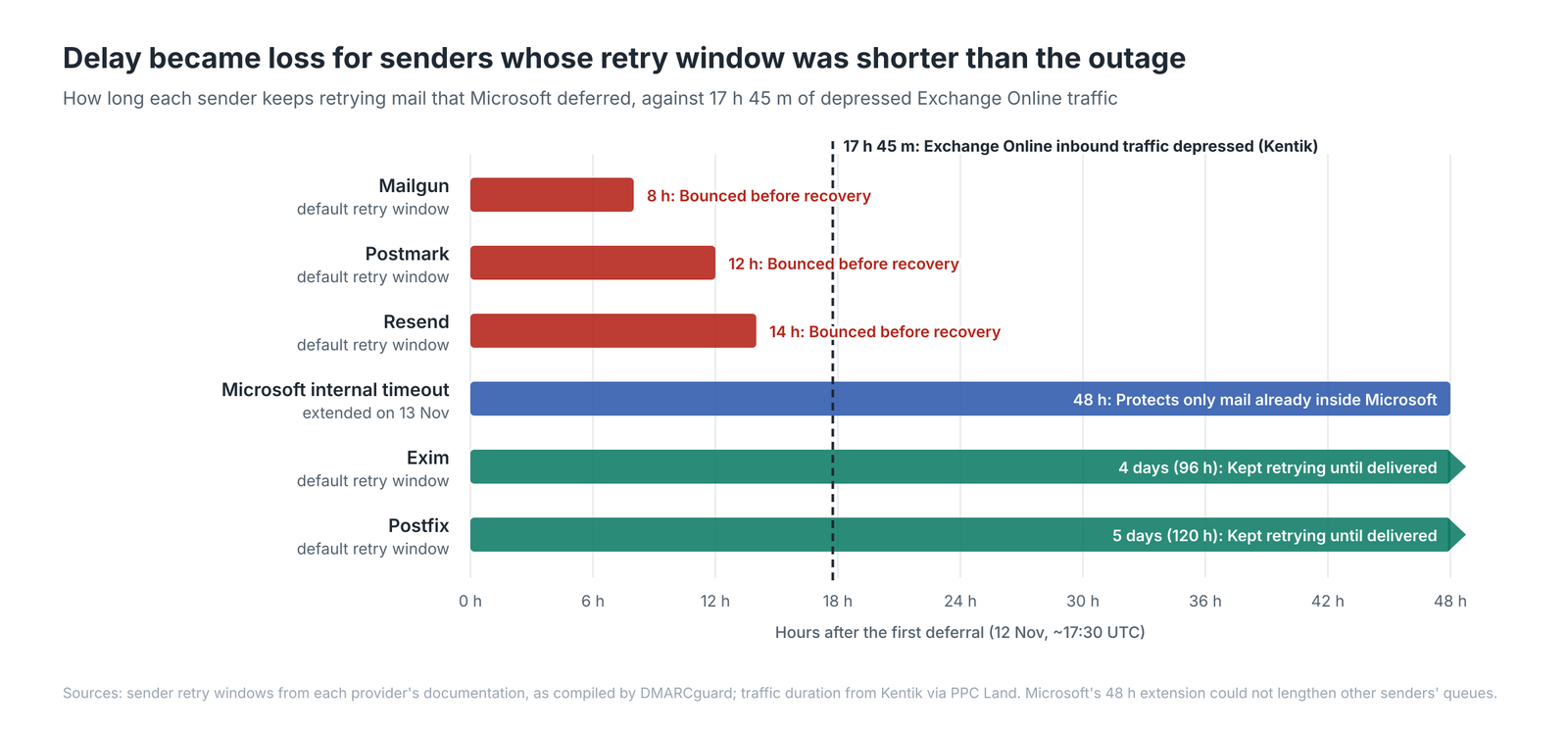
Delay became loss for senders whose retry window was shorter than the outage.
So whether your password reset, invoice, court filing or alarm notification survived wasn’t decided by Microsoft. It was decided by whoever sent it. Microsoft extending its own timeout to 48 hours only protected mail already inside its pipeline.
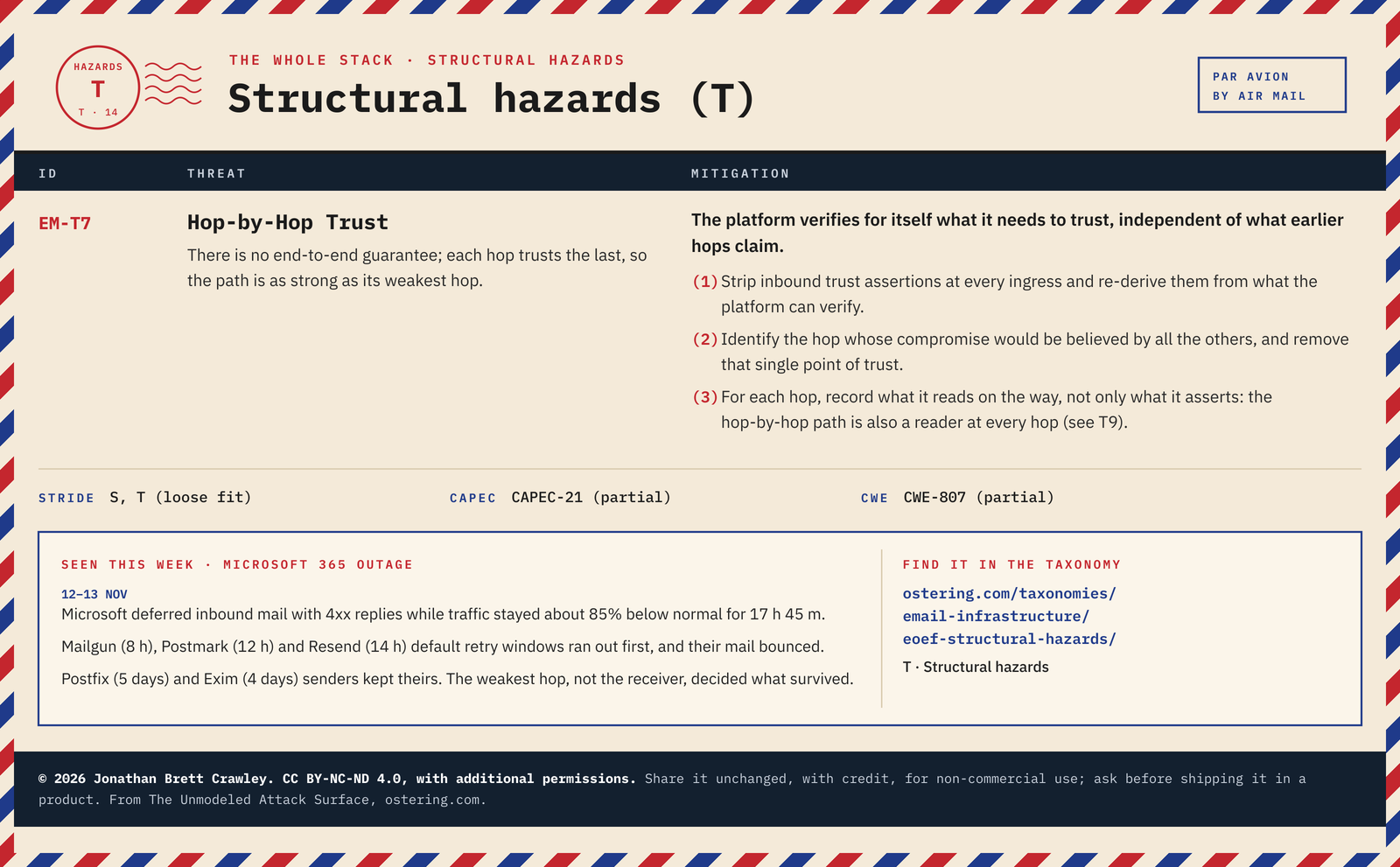
That’s EM-T7 Hop-by-Hop Trust almost word for word: there’s no end-to-end guarantee, so the path is only as strong as its weakest hop. Measure 2 on the card is the one I’d act on this week: identify the hop whose compromise would be believed by all the others. Swap “compromise” for “failure” and you have the exercise every sender should run now. Which hop in your outbound path gives up first, and what happens to the message when it does?
It’s also EM-T5 Interpretation Differential: every sender received the same reply code and did something different with it.
Neither card quite says the receiver can’t lengthen a queue it doesn’t own, so that’s now its own entry: EM-T11 Delay Becomes Loss, the high Trump. Its principle is that deferral is a contract with the sender’s queue: say how long, outlive it, and treat expiry as loss. Measure 1 is cheap: state the expected recovery horizon in the 4xx text and in Retry-After.
Unreviewed Change, Permanent Loss: EM-OP-10
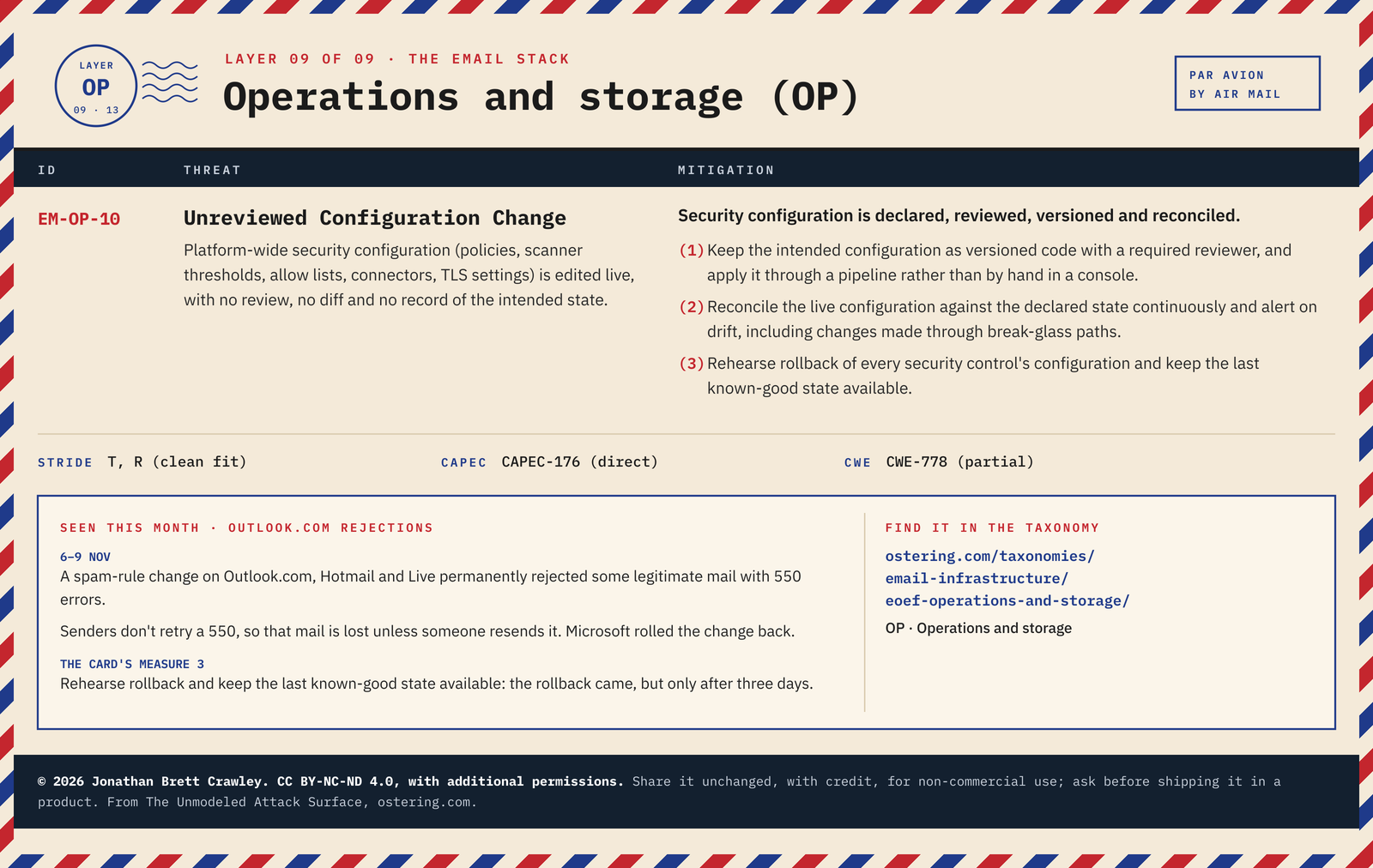
This wasn’t the first Microsoft mail incident this month. From 6 to 9 November, a separate spam-rule change caused some mail to Outlook.com, Hotmail and Live to be rejected outright with 550 errors, mostly from domains without a DMARC record. A 550 is permanent, so senders don’t retry it. That mail is gone unless someone resends it.
EM-OP-10 Unreviewed Configuration Change fits cleanly, and its third measure is the one that matters here: rehearse rollback of every security control’s configuration and keep the last known-good state available. Microsoft did roll back. It took three days. A rehearsed rollback is measured in minutes.
The incident also gave the taxonomy a new card, EM-OP-10.1 False Rejection, a sub-entry of EM-OP-10 because an unreviewed change is where a false rejection starts. A 5xx is final and the loss shows up only in the sender’s logs, so its first measure is that new rejection policies start as deferrals or tags and graduate to 5xx only after a review period with the rejection rate measured.
The Lure That Quoted the Incident: EM-HF-6
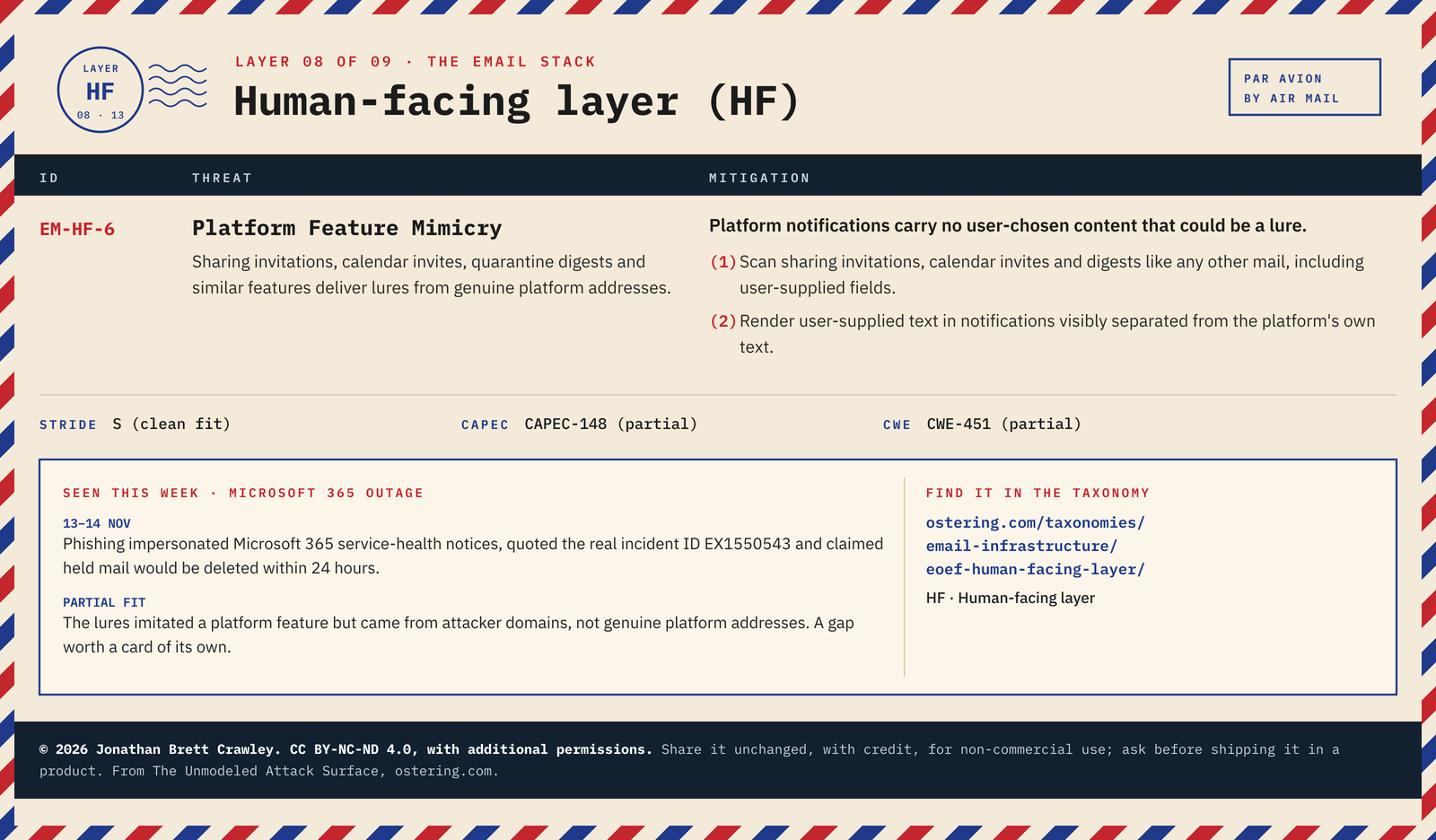
During the outage, admins couldn’t reliably load the Microsoft 365 admin centre, Service Health or message trace. Attackers noticed. On 14 November, Microsoft Threat Intelligence reported phishing that impersonated service-health notices, quoted the genuine incident ID EX1550543, and claimed held mail would be deleted within 24 hours.
I’ve rated this a partial fit for EM-HF-6 Platform Feature Mimicry, and I want to be honest about why. The card describes lures delivered from genuine platform addresses. These came from attacker domains, with display names such as “Outage Notification” (EM-HF-A Display Name Deception). The taxonomy’s own fit ratings exist for exactly this reason: a partial fit tells you the card is pointing in the right direction but not describing the whole thing. Here, it pointed me at a gap, which is now EM-OP-5.1 Control-Plane Blackout, a sub-entry of EM-OP-5 Audit Gap: when the consoles that show health and hunt threats fail with the platform, attackers get a window in which status can’t be verified. Its first measure: host status and incident notices on an independent platform, signed or otherwise verifiable, and tell operators in advance where it is.
Defender for Office 365 remediation and Threat Explorer were also impaired at the time, so the tools you’d use to pull those messages back were degraded while the campaign ran (EM-DP-8 Remediation Race).
The Bounce That Keeps On Bouncing
Here’s where my concern arises. Most sending platforms add an address to a suppression list after it bounces, and mailing-list software unsubscribes addresses after enough bounces. A bounce caused by an 18-hour outage looks exactly like a bounce caused by a dead mailbox.
That means some Microsoft-hosted addresses may now be silently excluded from newsletters, alert services and password resets. I haven’t seen a provider confirm this at scale, so treat it as an inferred risk. It’s cheap to check.
It’s also now in the taxonomy as EM-T10 Suppression After Outage, which I’ve marked as a plausible rather than a strong fit for that reason. The principle is worth remembering on its own: a bounce the receiver caused is not evidence about the address.
What the Outage Added to the Taxonomy
A threat taxonomy that never grows is a museum. Writing up this incident surfaced five threats the taxonomy didn’t describe well enough, so I’ve added them, three as structural hazards and two in operations and storage, where the platform’s own decisions live, each with the same anatomy as every other entry:
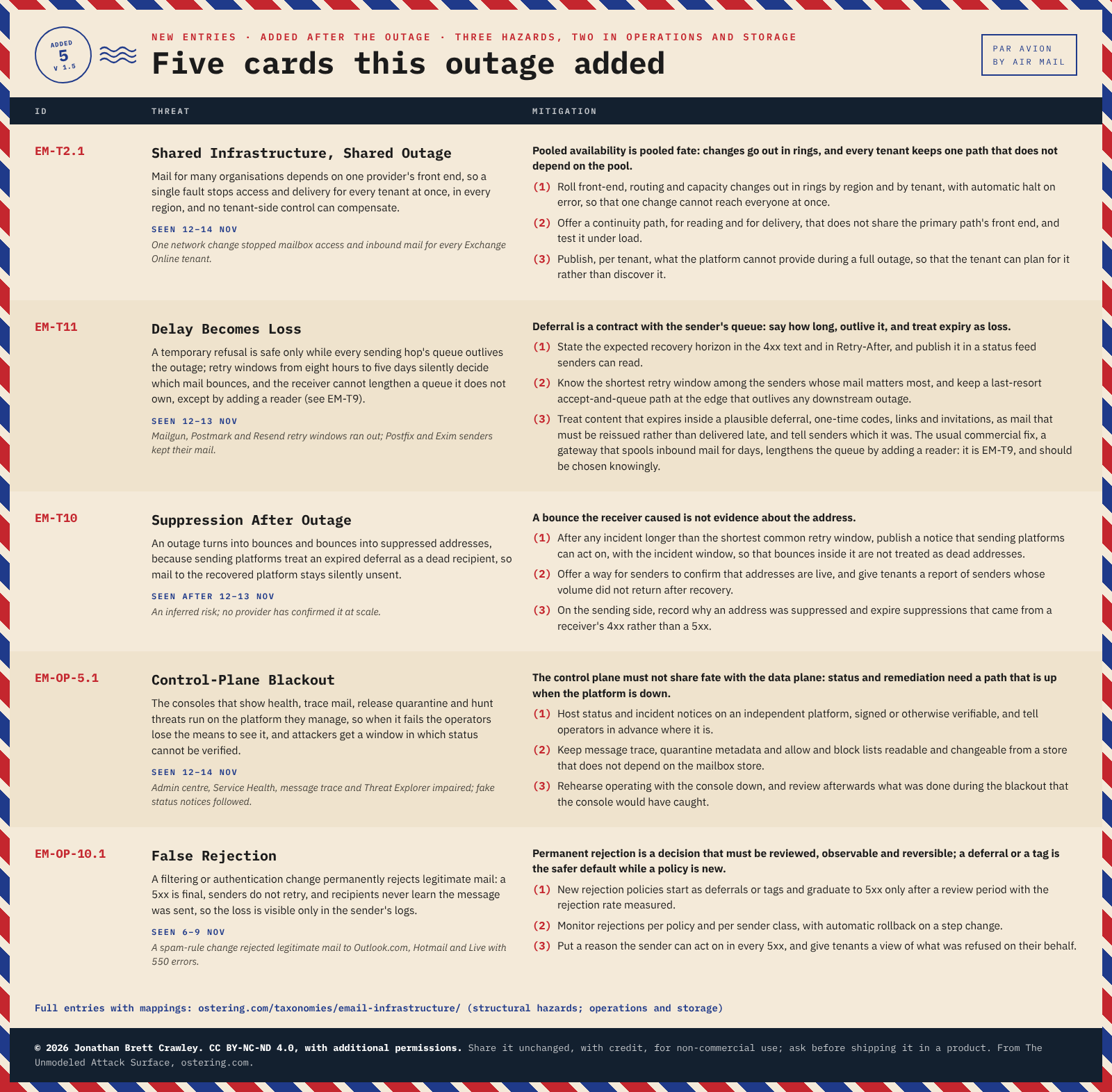
Five entries added to the taxonomy after the outage: three structural hazards and two sub-entries in operations and storage.
If you think one of them overlaps an existing card, or you’ve seen a variant I’ve missed, tell me. That’s how the taxonomy improves.
The One That Worries Me Most
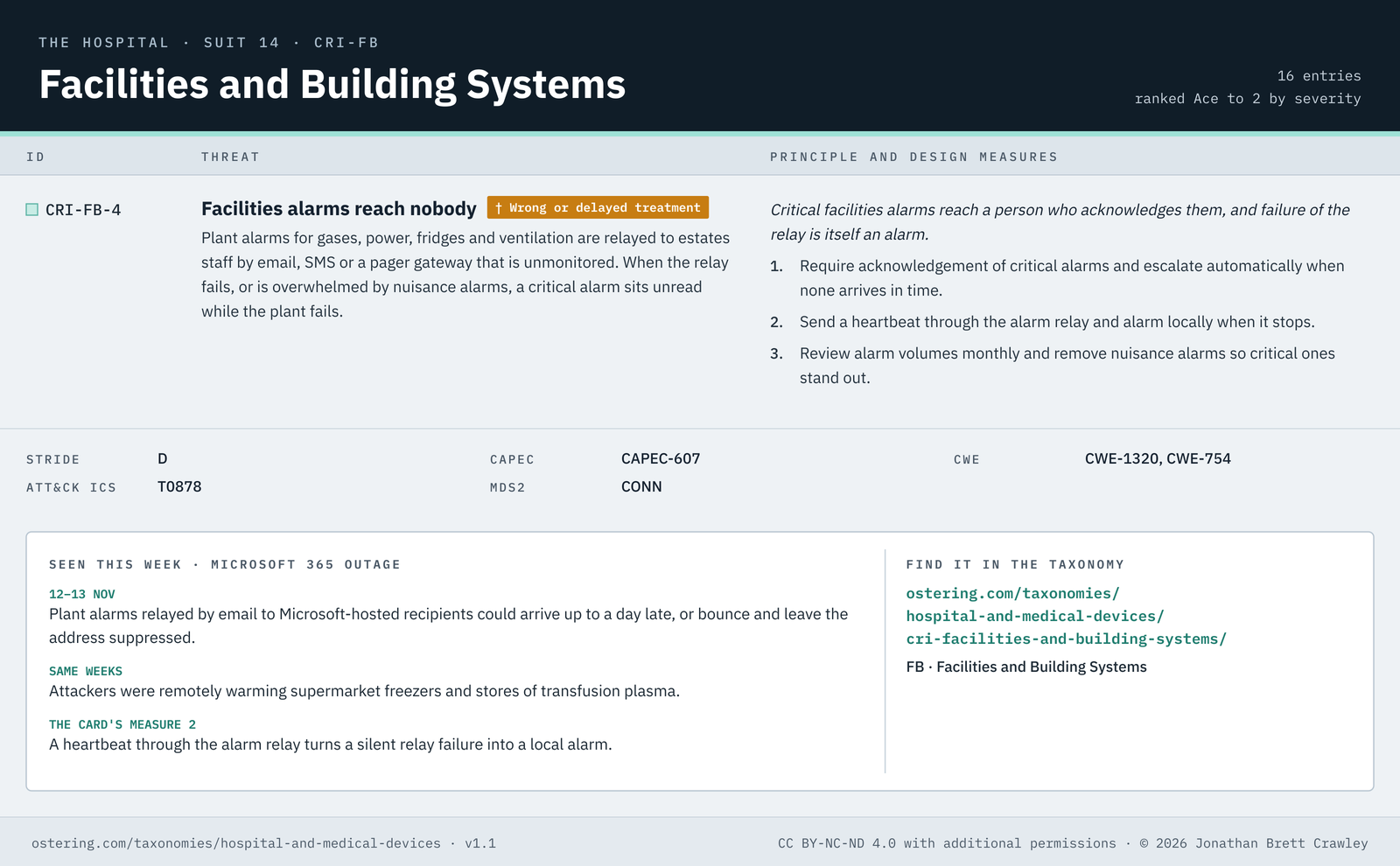
This one comes from a different deck: my hospital and medical device threat taxonomy, which uses the same anatomy but flags harm to patients. Hospitals often relay plant alarms for fridges and medical gases by email. That’s CRI-FB-4 Facilities alarms reach nobody, marked † for wrong or delayed treatment.
For most of 12 and 13 November, an email alarm sent to a Microsoft-hosted recipient could arrive a day late, or bounce and get suppressed. That happened in the same weeks that attackers were remotely warming supermarket freezers across Europe, and trying to do the same to stores of transfusion plasma in France. Two unrelated events, one shared weakness.
The card’s second measure is a single sentence that would have caught it: send a heartbeat through the alarm relay and alarm locally when it stops.
How to Use the Taxonomy on Your Own Incident
You don’t need to be an email specialist to do what I’ve done here. This is the process:
- Write the timeline first. What failed, when, and who noticed. Keep facts and inferences apart.
- Walk the map. Go section by section and ask of each entry: did this happen, or could it have? Mark strong and plausible fits separately.
- Read the fit ratings. A partial fit is a prompt to look harder, not a reason to drop the card.
- Lift the design measures straight into your actions. Cite the reference (EM-T7 measure 2, CRI-FB-4 measure 2) so the action traces back to a threat and a principle.
- Write down what didn’t fit. Those are your gaps, and they’re often the most valuable output.
The taxonomies are free to use under CC BY-NC-ND 4.0, with additional permissions, and you can download them from each taxonomy page in formats your tools can import, including SKOS for anyone who wants to wire them into a knowledge graph. And if you’d rather run this as a workshop, the same entries are being turned into a card game; until then, put the taxonomy page on the screen and let the team argue about which entries fit.
Note to…
Note to anyone sending mail: run EM-T7 measure 2 against your own outbound path. Check your queue lifetimes for mail to Microsoft-hosted domains; somewhere between 48 and 72 hours is a sensible floor. Then reconcile everything that bounced or was suppressed since 6 November, resend what matters, and apply EM-T10 measure 3: expire suppressions that came from a receiver’s 4xx rather than a 5xx.
Note to email platform builders: EM-OP-10 measure 3, rehearse rollback, is the difference between a three-day incident and a three-minute one. Add EM-T2.1 measure 1 (ring your rollouts) and EM-OP-5.1 measure 1 (put status somewhere that’s up when you’re down).
Note to hospital estates and clinical engineering teams: put CRI-FB-4 measure 2 in place this month. Give fridge, medical-gas and care alarms a heartbeat, and a path that doesn’t depend on one email provider.
Final Thoughts
None of this was an attack, and I want to be clear about that. Microsoft reports no evidence of malicious activity. But the outage showed something email engineers know and most organisations forget: email delivery is a chain of independent decisions made by servers you don’t control.
What I like about working through an incident with the taxonomy is that it stops the conversation ending at “Microsoft had a bad day”. Every card that fits comes with something you can change, and every card that doesn’t quite fit tells you where to look next. When Microsoft’s Post-Incident Report lands, I’ll be checking it against the map: whether any mail was dropped inside Exchange Online, whether DLP and outbound protection failed open or closed, and why the change wasn’t linked to the impact sooner.
Stay tuned!
Tags: Threat Taxonomy, Email Security, Threat Modeling, SMTP
You may also like:

AI Assisted Threat Modeling
The Threat Model Was Never the Point: What...

The Unmodeled Attack Surface - A Threat Taxonomy for Email Infrastructure
TL;DR: Email infrastructure has never had a threat...

Threat Modeling MCP
Threat Modeling the Model Context Protocol: Your Agent...

Threat Modeling AI Systems: A Complete Playbook for Practitioners
The Blast Radius - Edition [4] Over the...