Software Engineering Has Regressed 50+ Years Since AI

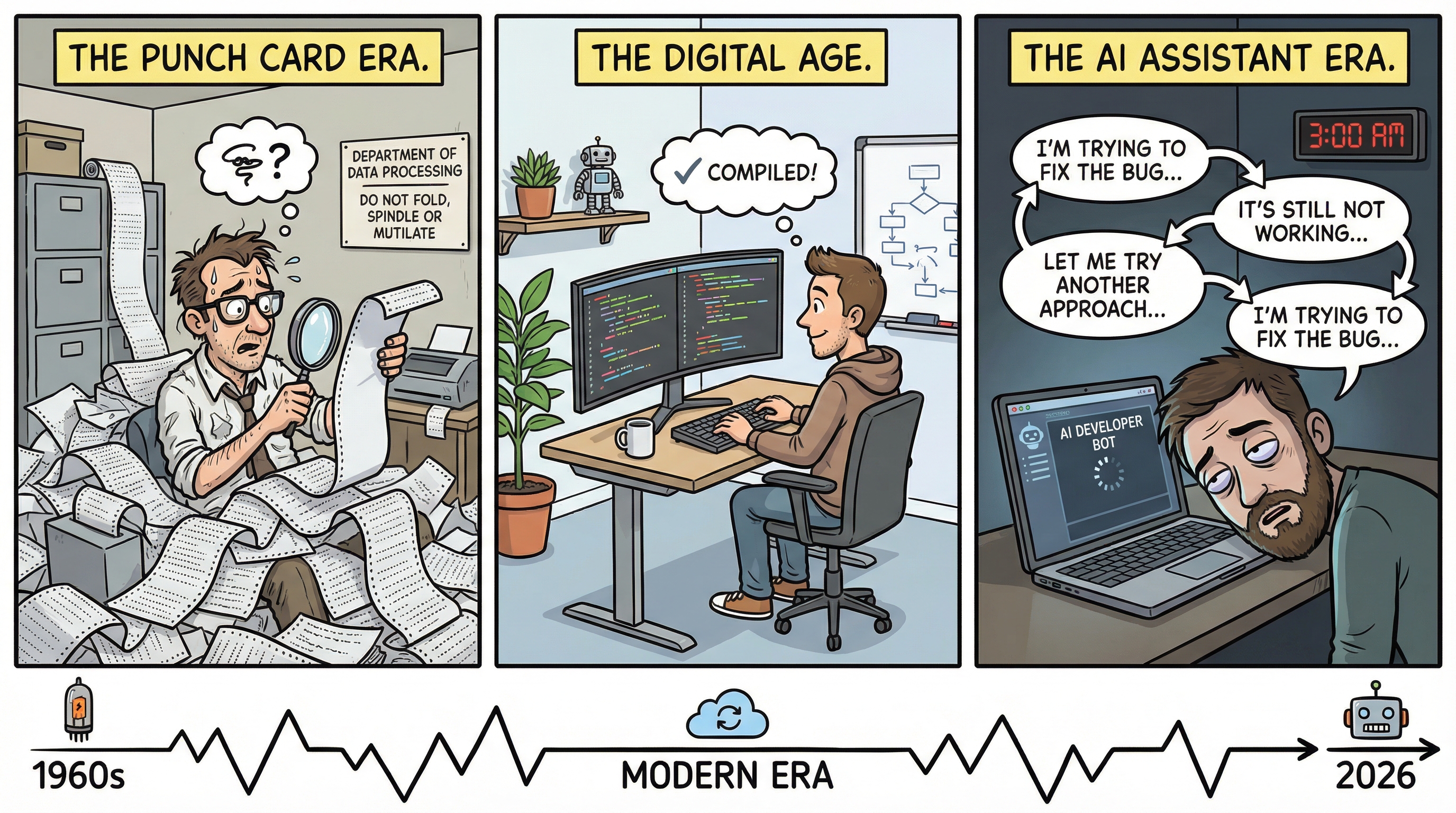
Bear with me on this train of thought.
What Is Software Engineering?
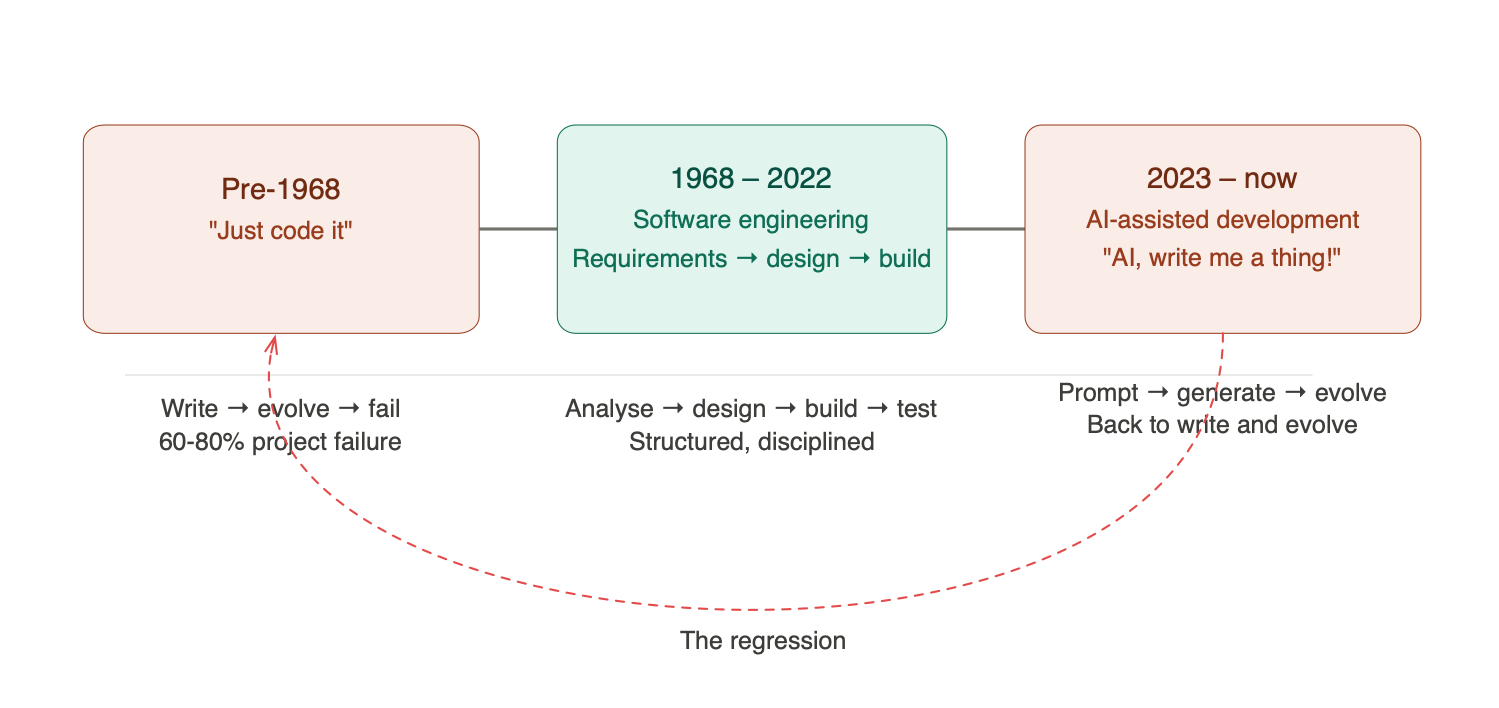
In 1968, a NATO conference in Garmisch, Germany coined the term “Software Engineering.” The whole point was to distinguish engineering software, with requirements, design, analysis, and structured process, from simply writing code and seeing what happens. The industry had learned the hard way that the latter approach produced fragile, over-budget, unmaintainable systems. Somewhere between 60–80% of projects failed when teams skipped the structured process and dove straight into code.
So what’s the difference between Software Engineering and Development? Development is when you say “let’s make a thing” and start writing code. It’s not quite what you wanted, so you add to it. You modify it. The product evolves, not by design, but by accident. Software Engineering is what happens when you stop, think, analyse the problem, design a solution, and then build it.
Now here’s my concern. With the arrival of AI-assisted coding, we’ve come full circle. “AI, write me a thing! AI, evolve the thing!” We’re back to development. We’ve regressed more than 50 years, and most people haven’t even noticed.
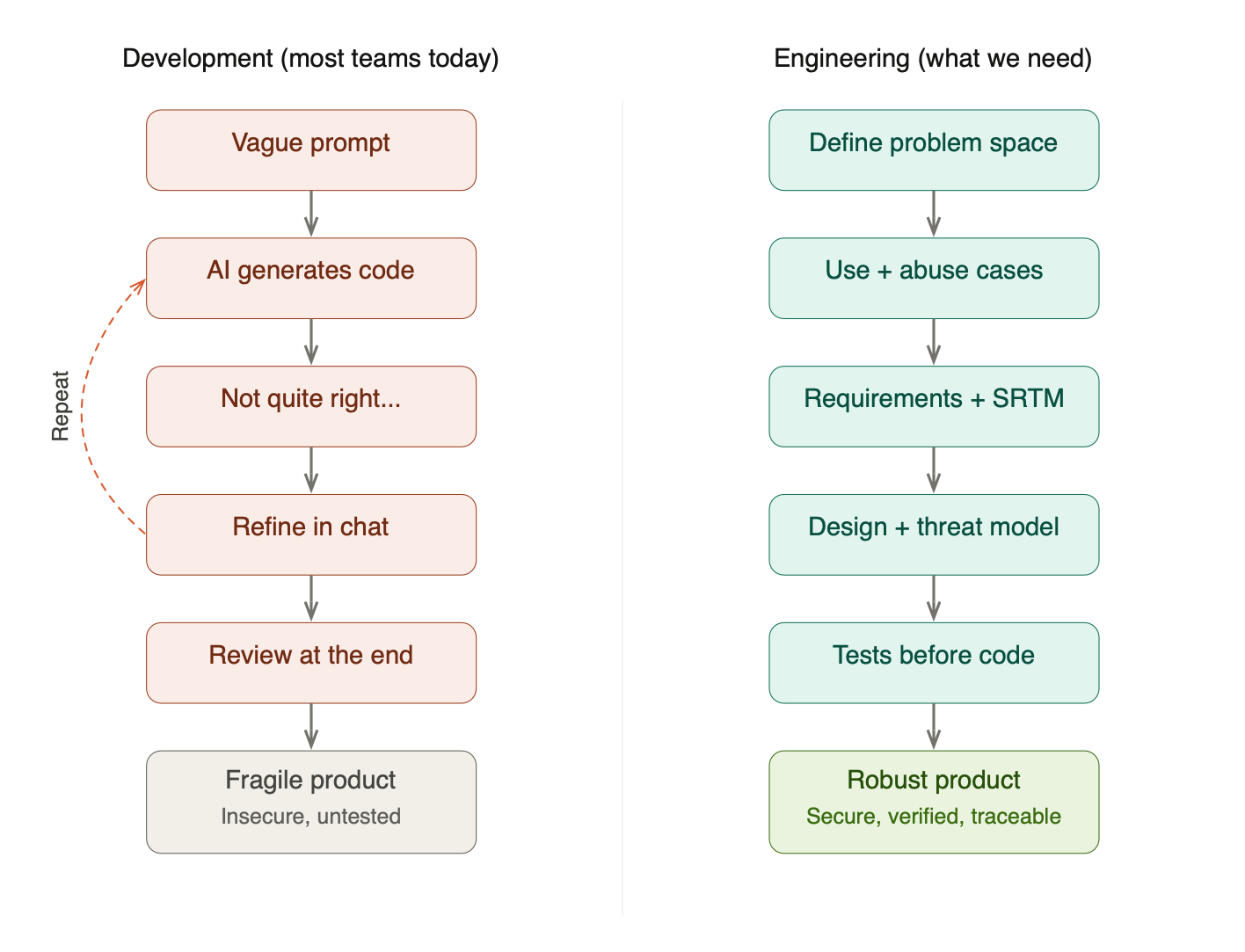
Recently I keep seeing posts with “AI First” and “Data First” alongside cartoons of something broken versus something well built. Really? If by “data” you mean requirements or design, then maybe. But that’s not what most people mean. They mean “feed the AI more context and it’ll figure it out.” That’s not engineering; that’s hope.
The Review Illusion
People are talking about guardrails. They’re talking about human-in-the-loop review at the end of the process. But let’s pause for a moment and reason through what that actually means.
With AI and a decent spec, you can have a full product with 50,000+ lines of code in a few hours. Are you really going to keep churning out projects of that size and have someone review it all? Even with AI assistance, that review means considerable effort to remove false positives, understand the architectural choices the AI made (or didn’t make), and verify that the code actually does what it should.
End-of-process review is a sticking plaster. It gives you the illusion of control without the substance. The real question is: how do we get better quality upfront through good practices? Practices like validating requirements, using Test Driven Development (TDD), and building a Security Requirements Traceability Matrix (SRTM) to ensure we have all the necessary test artefacts to verify that the correct requirements are met.
Some people will start whinging at this point about this taking too long and there being a release date. To those people I say: more speed, less haste. For a small upfront investment in analysis, design, and planning, you will probably take less time overall, produce better quality results, and spend less money. Your call.
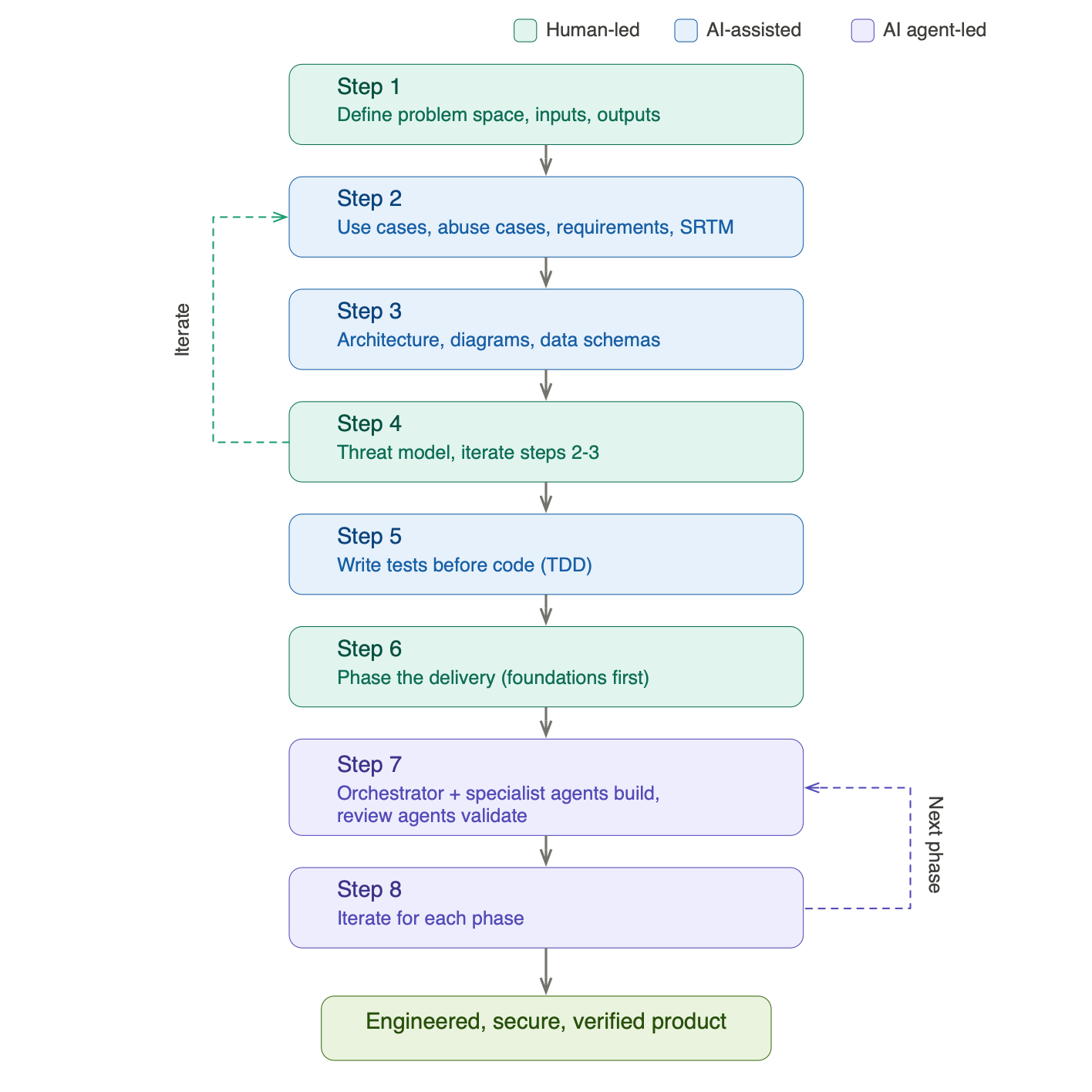
Step 1: Define the Problem Space
So how do we go about this?
- First, define the problem space: what are you actually trying to solve?
- Define what inputs are needed to give context to the problem
- Define what the expectations are: the outputs
Once you have that, you know what you want to solve, what you need to solve it, and what you expect as an outcome. Simple enough. But right now, most people stop here. They take this rough framing, hand it to AI, and ask for the finished product. Then they’re dismayed by the output and start going back and forth, refining what was generated. Sound familiar? It’s the same pattern as the projects that were written and evolved in the past, only now AI is doing the writing and the human is doing the evolving. The failure mode hasn’t changed. Just the tools.
If you’re building a house, you don’t just say to the builder “build me a house.” You’d normally involve an architect, who would ask questions like:
- Where do you want to build the house?
- They’d visit the site to understand the type of land
- They’d go to the land registry to understand any rights of access
- They’d determine what sort of foundations would be required
- They’d ask how many bedrooms the house should have
If they didn’t do any of that and built a 2-bedroom house when you needed 3, you’d have to build an extension straight away. Even if that’s possible, it would probably ruin the original design. The layout would never be optimal: you’d end up going through the kitchen to get to the extension, then up the back stairs to the bedrooms. Sub-optimal doesn’t begin to cover it.
So why is software any different? What makes people think that vague and incomplete analysis is going to give them good results, just because AI is involved?
Step 2: Develop the Concept
What you now have from Step 1 is, more or less, your first prompt. But not a prompt to write software; a prompt to develop the concept further.
Before AI, this further development meant defining:
- Use cases or user stories: what the system should do
- Abuse cases or abuse stories: what we don’t want to happen
- Security use cases or security user stories: how we prevent what we don’t want from happening
Ideally you’d cover all three, but all too often the last two are overlooked. In the AI-assisted world, the process is the same: we ask AI to create all three, then we (the human engineers) review and refine them through conversation until we’ve covered the different issues in the problem space.
This is where the human expertise is irreplaceable. AI is excellent at generating comprehensive lists of use cases from a well-defined problem space. It’s far less reliable at knowing which edge cases matter most in your specific context, which abuse cases are realistic given your threat landscape, and which security controls are proportionate to the risk. That judgement comes from experience, and it’s the engineer’s job to apply it.
So at this point we know:
- The problem space
- The inputs and outputs
- The different individual problems we want to solve
- What we don’t want to happen
- How we can avoid what we don’t want to happen
Now we ask AI to create an initial set of functional and non-functional requirements, covering performance, security, and quality. Through conversation, we validate and refine these until we’re satisfied with the outcome. Subsequently, we create a Security Requirements Traceability Matrix (SRTM) off the back of those requirements, defining the test artefacts required to verify that each requirement is met.
A word on the ASVS, the Application Security Verification Standard from OWASP. It’s useful for validating that you’ve got the right security controls in the first place, not just verifying them. Think of it as a checklist of “have we even considered this?” before you get into the business of testing. There’s also an ASVS for AI if you’re implementing AI-based systems. As far as verification goes, that’s what you’re defining the tests for in your SRTM.
If you’ve read my previous posts on threat modelling, you’ll recognise the SRTM as the connective tissue that links requirements to threats to tests. Without it, you’re flying blind: you might have requirements, you might have tests, but you have no way to prove that the tests actually verify the requirements. That traceability is what separates engineering from development.
Step 3: Design the Architecture
With validated requirements, use cases, and abuse cases in hand, the next step is design. This is where AI can be enormously productive, not because it replaces the architect, but because it can rapidly generate artefacts for review.
Ask AI to:
- Design the architecture of the system
- Design the individual components: services, data layer, frontend, and so on
- Define the data schemas
- Define the data flows and component interactions
It must create the following for your review:
- A system diagram showing the high-level architecture
- Software architecture diagrams for each component
- Data schema diagrams
- A data flow diagram for threat modelling, with trust zones defined
- Sequence diagrams showing the different use cases defined in Step 2
The critical word here is review. Every artefact AI creates should be examined by an architect or engineer, and corrections made where necessary. AI is remarkably good at producing plausible-looking architecture diagrams that contain subtle but significant flaws: missing trust boundaries, inappropriate data flows, components with responsibilities that should be separated. The architect’s job isn’t to draw the diagrams from scratch (AI handles that nicely), but to spot the things that are wrong or missing.
All of these artefacts, together with the requirements from Step 2, form the specification of the project. This is your source of truth. When someone asks “why did we design it this way?” the answer is in the spec, not in someone’s memory of a conversation with ChatGPT.
Step 4: Threat Model the Architecture
Now we threat model what we’ve designed. If you’re following a structured approach, whether STRIDE, STRIDE-per-Element, or the card game approach I wrote about in Threat Modeling Gameplay with EoP, this is where it plugs in.
The threat model will almost certainly surface new threats that weren’t captured in the original abuse cases. That’s expected and healthy. What matters is that you iterate: go back to Steps 2 and 3, update the requirements, use cases, abuse cases, security use cases, the SRTM, the design, and all diagrams to reflect the new mitigations.
This iteration loop is where the real engineering happens. It’s also where AI shines, because updating a dozen artefacts to reflect a new security control is exactly the kind of tedious, error-prone work that AI handles well, as long as a human is checking the results.
Note to engineering leaders: If your teams are skipping this step because “we’ll add security later,” you’re building the 2-bedroom house and hoping the extension will work out. It won’t. Security bolted on after the fact weakens the design, introduces inconsistencies, and costs more to implement than getting it right upfront.
Step 5: Write the Tests Before the Code
Now that we know the architecture and have a complete SRTM, we ask AI to write the tests we defined, before a single line of production code is written.
This is Test Driven Development, and it’s not new. What’s new is that AI can generate comprehensive test suites from well-defined requirements with remarkable speed. The tests cover the functional requirements, the non-functional requirements (performance, security, quality), and the specific abuse case mitigations from the threat model.
As the project advances, these tests serve two purposes. First, they verify that the requirements are met: every green test is a requirement satisfied, and you can update the SRTM to reflect progress. Second, they act as a safety net during development; when AI generates code that subtly deviates from the specification (and it will), the tests catch it.
Without upfront tests, you’re relying on AI to both write the code and judge whether the code is correct. That’s the fox guarding the henhouse.
Step 6: Phase the Delivery
Break the project into phases:
- Phase 1 must cover the foundational elements: the things that are required for the rest of the project and that shouldn’t be added later because retrofitting them would weaken the design. Authentication, authorisation, logging, data access patterns, error handling; these are the foundations. Get them wrong or skip them, and everything built on top inherits the weakness.
- Phase 2 is the Minimum Viable Product (MVP): the smallest set of functionality that delivers value, built on the solid foundations from Phase 1.
- Phase 3 and beyond build incrementally on what exists, each phase adding capability without undermining the architecture.
The phasing isn’t arbitrary. It’s driven by the dependency relationships in your architecture. Components that other components depend on must come first. This is exactly the same principle as the dependency graph analysis I described in Threat Modeling Your Dependencies, except here the graph is your own system’s internal architecture rather than third-party libraries.
Step 7: Orchestrate Specialist Agents
This is where multi-agent workflows become genuinely useful, and where the concepts of agent skills and orchestrators transform AI-assisted development from “ask a chatbot to write code” into something that actually resembles an engineering team.
The Orchestrator Pattern
Rather than throwing the entire specification at a single AI agent and hoping for the best, the orchestrator pattern mirrors how an experienced technical lead runs a team. An orchestrator agent receives the specification from Steps 1–5 and breaks the work into discrete tasks. It then delegates those tasks to specialist agents, each with focused context and defined capabilities. When each agent completes its work, the orchestrator integrates the results, checks for consistency, and validates against the specification.
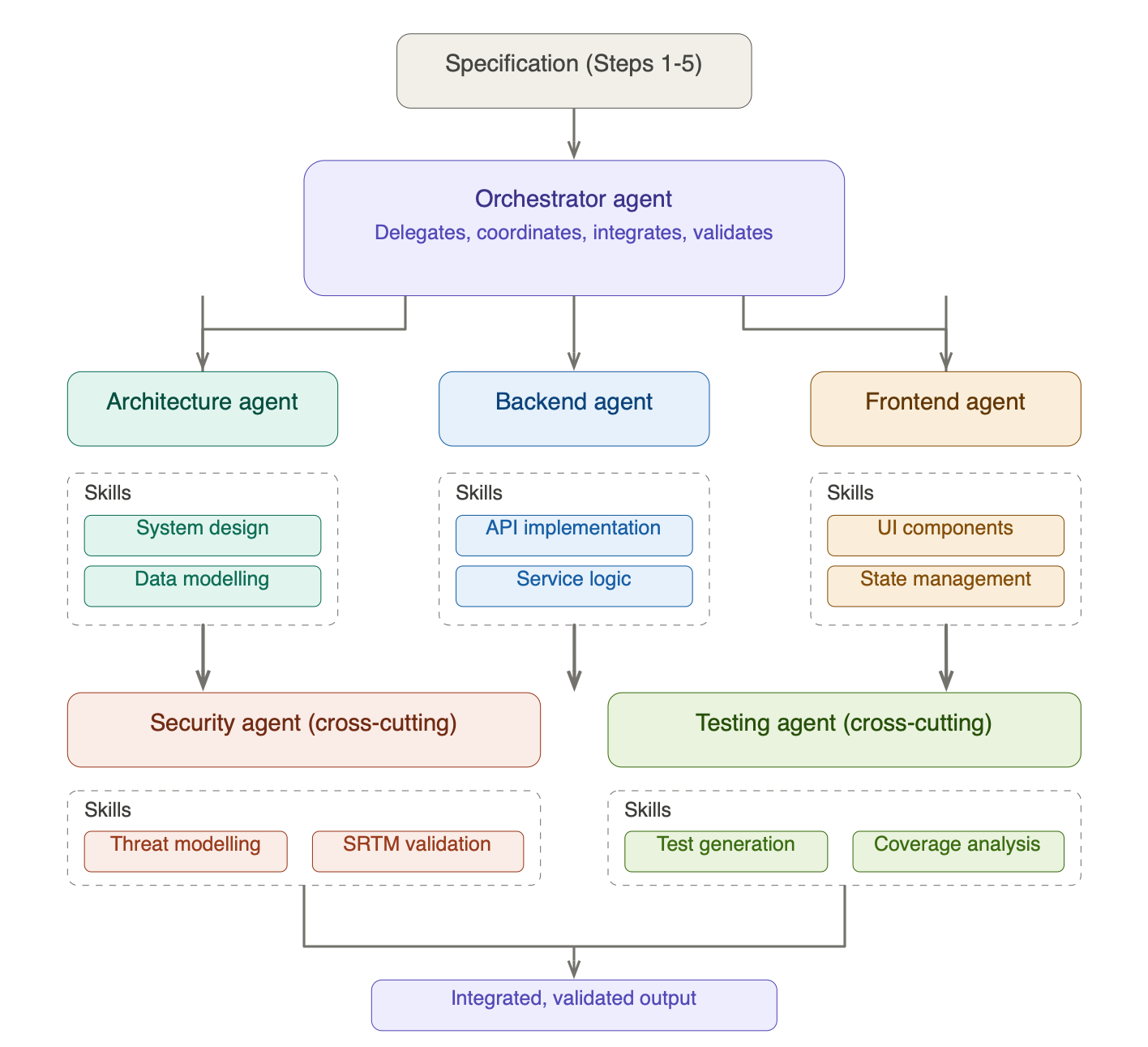
The key insight is that a specialist agent with narrow context outperforms a generalist agent with broad context. A backend agent that knows it’s building a REST API for a payments service, with the data schemas, sequence diagrams, and security requirements right in front of it, will produce significantly better code than a generalist agent trying to hold the entire system in its head.
Agent Skills: Focused Capabilities
Each specialist agent is equipped with skills: structured instructions, tools, and domain knowledge that focus the agent on a specific area of expertise. Think of skills as the equivalent of a developer’s specialisation, formalised into something an AI agent can use consistently.
For a typical project, you might have:
- Architecture agent, skills: system design patterns, component decomposition, data modelling, diagram generation
- Backend agent, skills: API implementation, service logic, database queries, error handling patterns
- Frontend agent, skills: UI component architecture, state management, accessibility standards
- Security agent (cross-cutting), skills: threat modelling, SRTM validation, ASVS compliance checking, secure coding patterns
- Testing agent (cross-cutting), skills: test generation from requirements, coverage analysis, performance testing, security test cases
- Review agent, skills: architecture review, code quality assessment, security review, performance analysis
The cross-cutting agents are particularly important. The security agent doesn’t just review the final output; it validates each workstream’s output against the threat model and SRTM as the work progresses. The testing agent runs the upfront tests from Step 5 against each component as it’s delivered, catching deviations from the specification early rather than at integration.
Why Skills Matter
Without defined skills, an AI agent is just a large language model with a vague instruction to “write some code.” With skills, it has:
- Focused context: only the information relevant to its task, reducing noise and hallucination
- Consistent patterns: reusable approaches that produce uniform quality across the codebase
- Domain knowledge: best practices, security standards, and design patterns specific to its area
- Tool access: the ability to run linters, test suites, static analysis, or query dependency databases as part of its work
This is the difference between asking a random person to help you build a house and hiring a plumber, an electrician, and a bricklayer who each know their trade. The orchestrator is the site foreman: they don’t lay every brick themselves, but they make sure the plumber and the electrician aren’t working at cross-purposes.
But Here’s Where My Concern Arises
Even with an orchestrator and specialist agents, there are failure modes that need active management:
Architectural drift. When an agent encounters an ambiguity in the spec, and there will always be ambiguities, it makes a choice. That choice might be perfectly reasonable in isolation but inconsistent with choices another agent made for another component. The orchestrator needs to detect and reconcile these inconsistencies, which means it needs to understand the architecture deeply enough to spot them.
Integration boundaries. Individual components might pass their unit tests beautifully and still fail when brought together. Interface contracts, data format assumptions, timing dependencies, error propagation; these surface at integration time, and they’re the things agents handle least reliably. The orchestrator must validate at these boundaries, not just within workstreams.
Skill drift. Skills need maintenance. As your project evolves, the patterns and standards encoded in your agent skills need to evolve with it. A backend skill that encodes last month’s error handling pattern while the architecture has moved on will produce inconsistent code. Treat skills as living artefacts, not static configuration.
The review shouldn’t wait until the end. Instead of a single review after all workstreams complete, I’d recommend reviewing each workstream’s output as it completes, before integration. The review agent examines the code for architecture compliance, performance, and security. Then integrate, and review again at the integration boundary.
Your tests written upfront should tell you whether the functional and non-functional requirements are met. The threat model should be updated with any changes that were made to the design along the way. And if you want an additional layer of assurance, AI-assisted penetration testing can help find things you’ve missed.
Step 8: Iterate
Iterate on Step 7 for each subsequent phase. Each iteration should be faster than the last, because the foundations are in place, the testing framework is established, the agent skills are refined, and the specification is clear.
But each iteration also brings its own risks. New features interact with existing ones in ways that weren’t anticipated. The threat model needs updating. The SRTM needs new entries. The temptation will be to skip these updates because “we already did the security work in Phase 1.” Resist that temptation. The threat landscape of your application changes with every feature you add.
What About Existing Projects?
I want to address a question I can already hear forming: “This is fine for greenfield projects, but what about the mountain of AI-generated code we’ve already shipped?”
Fair point. If you’ve already built something the “AI, write me a thing” way, you’re not going to throw it away and start over. But you can apply this process retrospectively:
- Reverse-engineer the requirements. Ask AI to analyse the existing codebase and extract what it thinks the requirements are. Then have your engineers validate and correct them.
- Build the SRTM after the fact. Map the inferred requirements to existing tests (if any) and identify the gaps. Write the missing tests.
- Threat model what exists. Create the data flow diagrams from the actual code, define trust boundaries, and run STRIDE against it. You’ll almost certainly find issues, but better to find them now than after a breach.
- Prioritise by risk. You can’t fix everything at once. Use the business risk approach I described in Threat Modeling Your Dependencies: associate asset values with the application, calculate risk exposure, and fix the highest-risk gaps first.
It’s more work than doing it right the first time. It always is. But it’s considerably less work than dealing with the consequences of not doing it at all.
Final Thoughts
The irony of the current moment is striking. We have the most powerful code generation tools in history, and we’re using them to repeat the exact mistakes that the software engineering discipline was invented to prevent. We’re generating more code faster with less thought, and then wondering why the results are fragile, insecure, and expensive to maintain.
AI hasn’t caused this regression on its own. The underlying problem is the same one NATO identified in 1968: the temptation to start building before you understand what you’re building and why. AI has simply made it easier to give in to that temptation, because the cost of generating code has dropped to near zero. But the cost of generating the wrong code hasn’t changed at all.
The process I’ve outlined here isn’t anti-AI. Quite the opposite: AI is involved at every step, and the orchestrator pattern with specialist agents and defined skills is the mechanism that makes it work at scale. But it’s AI in service of engineering, not AI as a substitute for it. The human engineer defines the problem, validates the requirements, reviews the design, threat models the architecture, and judges whether the output is fit for purpose. The orchestrator coordinates specialist agents to execute efficiently. The skills ensure each agent works to a consistent standard. And the tests, written upfront, verify that the specification is met.
What AI doesn’t do, what it can’t do, is replace the judgement that ties it all together.
Note to engineering leaders: If your teams are measuring productivity in lines of code generated per hour, you’re measuring the wrong thing. Measure requirements validated, tests passing, threat model coverage, and defects found before production. Those are the metrics that tell you whether you’re engineering software or just generating it.
MORE SPEED, LESS HASTE.
Stay tuned!
You may also like:

Software Engineering Security Culture
We need to fix the culture, from top to bottom in the software engineering industry. Here are just some of the issues as I see them and what we should be doing about them.